Getting around
Where everything lives, how the playbook is put together and how to find your way without getting lost.
A reference manual fails in exactly one way: you can’t find the thing you need when you need it. So before you run the first activity, here’s the layout — what’s on the shelf, how the playbook is put together and how to move around it.
What’s on the shelf
Everything sits in the sidebar on the left, behind the drawer on a phone. Four sections:
- Introduction. What a playbook is, what this one covers and a detailed walk-through of the subway map. Read it once, then leave it alone.
- Playbook. The delivery chapters — one for every stop on the subway map, plus pre-mobilization. Every chapter has the same shape: goals and impact, inputs, process, outputs, templates. When your team is about to run an activity, this is what you open.
- Guides. The techniques you reach for inside those chapters, in two families. The process guides are short and mechanical — 5 Whys, fishbone, pre-mortem, Pareto, SWOT, TRIZ, dot voting, 1-2-4-All, example mapping and a dozen more. The workshop guides are end-to-end facilitation walk-throughs for the sessions I run most often: waste walk, GembaKai readout, rework, automation, planning and event storming.
- Templates. Working artifacts you copy and fill in — architecture umbrella, product vision, feature specifications, risk log, stakeholder map, service catalog, gap analysis and more. Each one encodes what a good version of that document actually contains.
A lock-open icon beside a sidebar entry marks a chapter that’s free for everyone. The rest are for subscribers.
How the playbook is built
The playbook is organized into four sections that group like-kinds of activities together. These groups describe different focus areas in the software development lifecycle. Pre-mobilization sits outside them. It happens before the engagement properly exists, so it stands on its own.
Pre-mobilization. Pick the team, brief them, get the project wiki and the statement of work in order. Internal only. Your customer isn’t in the room yet.
1.0 Mobilization. Team mobilization, current state analysis, product vision, business capabilities. Who’s doing this, what exists today and what you’re aiming at.
2.0 Blueprinting. Iterative design: product strategy, roadmaps and OKRs, strategic event storming, domain modeling, context mapping and the architecture that falls out of them. The shape of the thing.
3.0 Delivery. Continuous delivery: value mapping, security and governance, product increments, modeling, specification, elaboration, engineering, validation. Build it.
4.0 Operations. Runtime: product delivery, compliance, review, release, monitoring, incident capture. Run it, and route what you learn back upstream.
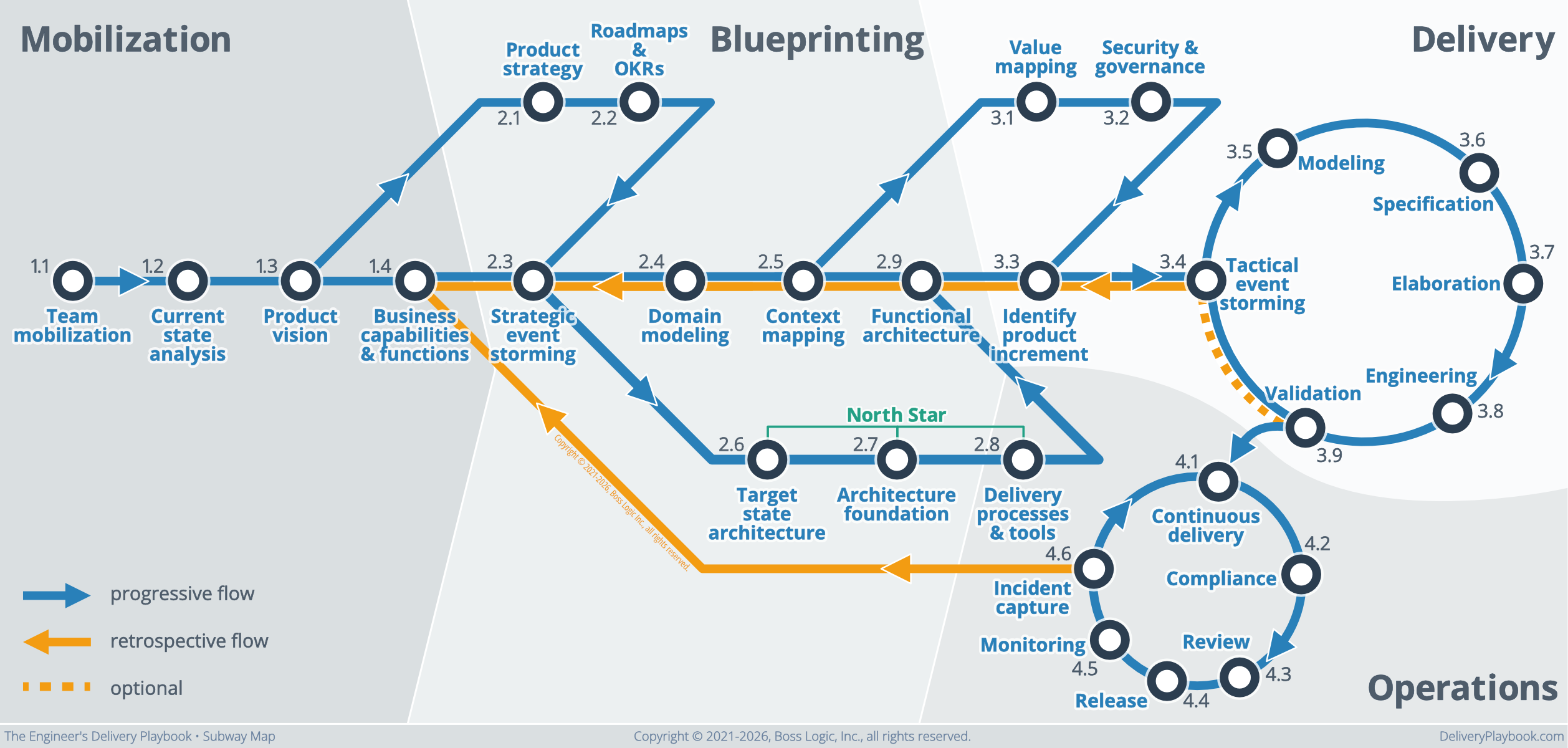
Across those four sections are 28 numbered activities. The numbering carries meaning: a higher-numbered activity depends on outputs from lower-numbered ones, so 4.1 Continuous delivery expects 3.9 Validation to be finished and signed off.
Two things people assume about this that aren’t true.
It isn’t a methodology. The playbook slots into whatever operating framework you already run: Scrum, Kanban, waterfall. It’s compatible with a Product Operating Model, and that’s the context I’d pick if I were starting a team from scratch, but nothing here demands it. The playbook tells you what to produce and what “ready” means. Your framework decides how the calendar gets organized.
It isn’t a one-way street. The map carries a retrospective flow, drawn in orange and running backward, precisely because delivery is iterative. You’ll return to domain modeling with detail you didn’t have the first time. You’ll write a regression test that changes a specification. The return trip is designed in, not a planning failure. Getting started: Using the Delivery Playbook explains how to read both flows in detail.
Getting around
The navbar
Three controls sit in the upper right corner.
The magnifier opens full-text search across every chapter, guide and template. ⌘K — Ctrl-K on Windows and Linux — does the same without reaching for the mouse. Arrow keys walk the results, Enter follows one, Esc closes. Go ahead and click it; the search box will open right over this page.
The compass drops the subway map down over the page. It’s the easiest way to navigate and works from anywhere in the playbook.
The sun switches between light and dark. On a template page a fourth control appears beside the magnifier — a download arrow that pulls that template down as a file you can drop straight into your own wiki.
The subway map
Click the compass and the map slides down over whatever you’re reading. Every stop on it links straight to that chapter, which makes the map a visual table of contents as much as a process diagram.
The stop you’re standing on glows red: you are here. Pre-mobilization has no stop, because it’s your trip planning step.
Four badges sit under the map — Workshops, Process guides, Templates and Customer Obsessed Engineering — covering the places the map itself doesn’t reach. Esc, or a click anywhere outside the panel, closes it.
The speed dial
Bottom right of every page is a round button with a map pin . Click it, or shift-tab to it, and six shortcuts fan out:
- Subway map — the same panel the compass opens
- Welcome — the playbook’s front door
- Workshop guides — facilitation walk-throughs
- Process guide — the technique library
- Templates — the artifact library
- COE blog — Customer Obsessed Engineering, where the arguments and case studies live
It follows you onto every page, so it’s the quickest way out of a chapter you’ve wandered into.
Everything else on the page
A breadcrumb runs across the top so you always know which section you’re in. Chapters open with their readiness check, the definition of ready, and close with links to the next activity in sequence.
Where a chapter has a companion article on the blog, a Deeper read badge appears near the top. Click it when you want the argument, the history and the war stories behind the checklist. The playbook stays deliberately lean; the blog is where the reasoning lives.